
Create a Wallet
Understand control and backup responsibility before creating a new wallet.
Open guide →From multi-chain assets, network selection, sending and receiving to DApp connections, token approvals, network concepts and wallet security, imtoken brings practical checks and essential knowledge into one clear path.
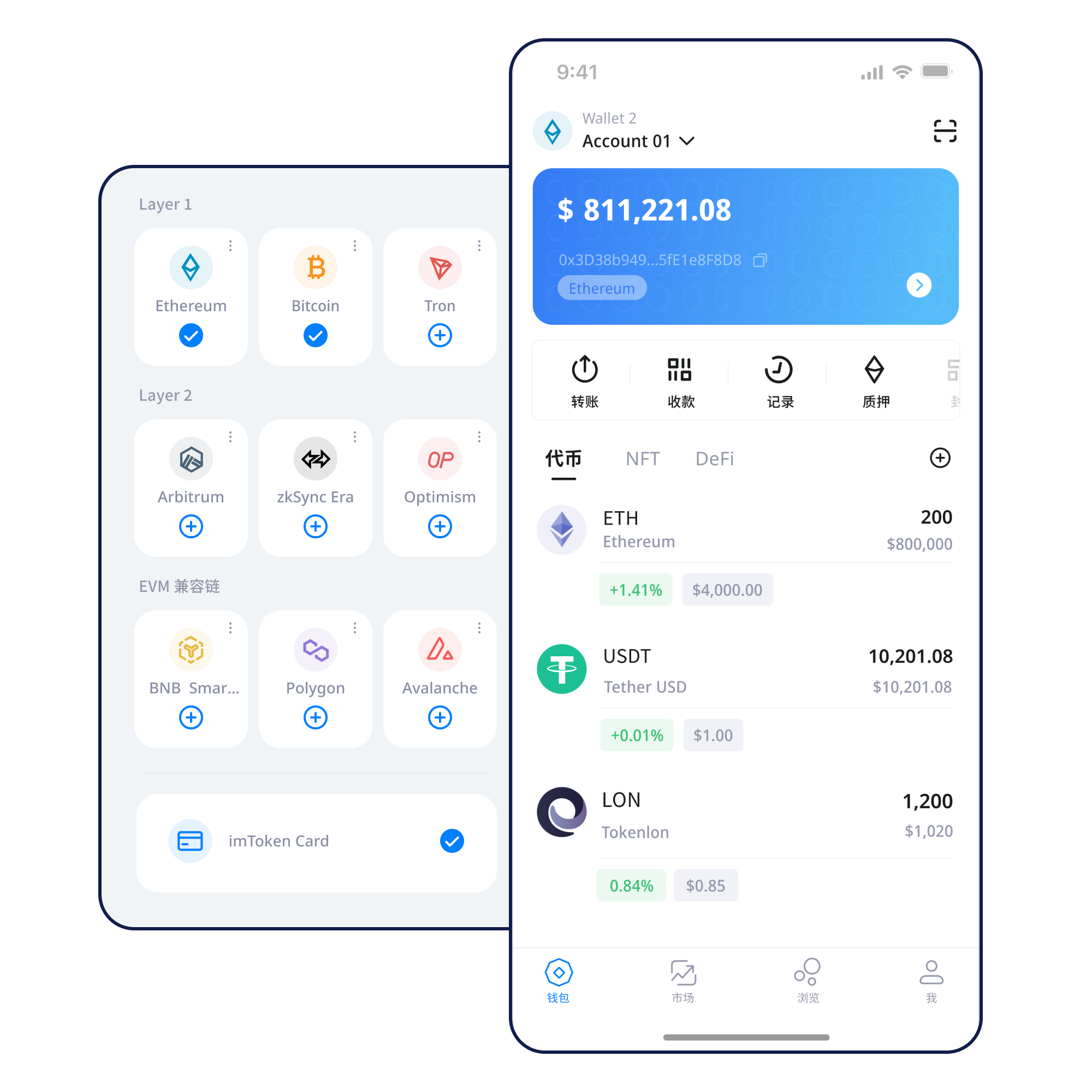
Wallet learning does not have to start with a glossary. Begin with the task you need to complete, then add the network, signature and security context around it.
Understand control and backup responsibility before creating a new wallet.
Open guide →Keep the seed phrase offline; avoid screenshots, cloud sync or sharing.
Open guide →Check the address and network, and make sure the sender uses the same network.
Open guide →Review address, network, amount and gas before sending, then keep the transaction hash.
Open guide →Verify the domain first, then review every signature and approval separately.
Open guide →A single wallet action often spans account control, network choice and an on-chain result. These topics are grouped by how they are used, not by interface buttons.
Understand separate network state, address checks and confirmation so similar addresses are not mistaken for identical networks.
Understand multi-chain use →View assets, switch networks and review activity on mobile while keeping device security separate from offline backup.
Explore the app →Receiving addresses, networks, amounts, gas and transaction hashes together describe a complete on-chain transfer.
Review transfer checks →A browser connection does not approve every later request. Review each signature, approval and contract interaction separately.
Learn about web connections →
Keep seed phrases and private keys offline, review DApp approvals and reject any request for sensitive credentials.
Open Security Center →Network choice determines where a transaction executes and affects gas, confirmation, asset display and contract addresses.
In a multi-chain environment, network name, chain ID, native gas asset and token contracts all need separate checks. A similar-looking address is not a substitute for selecting the correct network.
Transactions are received, included and confirmed by the network. Block height and transaction hashes are useful public references for verification.
Gas, contract execution and token approvals are common across EVM ecosystems, while contract deployments and asset state remain network-specific.
Cross-layer transfers may involve bridges, message confirmation or exit waits, so submission and destination availability are not always the same moment.
Fees can vary with network demand and transaction complexity. A public transaction hash can be used to inspect pending, successful or failed status.
From obtaining the wallet to reviewing transactions and approvals, each step includes a repeatable safety action.
Use the download entry on the official site and verify the source.
Understand creation versus import; do not enter seed phrases into web pages.
Keep the seed phrase offline and never disclose private keys.
Check the network, chain ID and required gas asset.
Review address, network and amount before transferring.
Keep transaction hashes, review DApp signatures and remove approvals you no longer need.
Connecting a wallet only establishes an account-access relationship. It does not mean later signatures, token approvals or contract calls should be accepted.
Wallet security does not come from an absolute promise. It comes from repeatable actions: keep sensitive keys offline, reject anyone asking for a seed phrase, verify networks and addresses before transfers, inspect DApp requests individually, and remove permissions you no longer need. Public computers, public Wi-Fi, screen sharing and remote-control sessions increase exposure, so sensitive actions are better performed on trusted devices and networks. Because confirmed on-chain transactions generally cannot be reversed by a wallet, the final pre-submit review matters more than after-the-fact recovery claims.
Open Security Center →Move from concepts to actions through an editorial path that connects wallets, networks, transactions and Web3.
Addresses identify accounts and receiving destinations; seed phrases and private keys relate to control; networks determine state and gas; transaction hashes support public verification; and DApp connections, signatures and approvals are different levels of request. Understanding them together helps prevent interface similarity from being mistaken for identical on-chain actions.
Read the guide →Treat staking as protocol knowledge and risk assessment, not as a return-promotion message.
Ethereum proof of stake relies on validators. Reward sources depend on protocol and network conditions, participation and validator performance, while exits and withdrawals can involve waiting.
Learn the staking mechanics →Validators can face protocol penalties, smart contracts can have technical risk, digital asset prices fluctuate, and third-party services can add operational or custody risk. Staking does not guarantee returns.
Understand validators →No fabricated dates, user counts or partnership claims—only content-focused notices by category.
Before using a network, verify its chain ID, gas asset and contract context.
Use transaction hashes and an explorer to confirm on-chain results.
Impersonated support, fake airdrops and remote assistance are never a reason to disclose keys.
Destination availability depends on the network and bridge design, so verify the destination state.
Common questions across wallets, networks, transactions, DApps, security and Ethereum PoS.
Seed phrases and private keys should remain under your own control. Never send them to another person or enter them into an unfamiliar page, chat or remote-control session.
Both relate to account control. A wallet may derive multiple private keys from a seed phrase, so exposure of either sensitive form can place assets at risk.
Networks maintain separate state even when address formats look similar. Check the network, chain ID, token contract and appropriate explorer.
Review the destination address, selected network, asset, amount and gas. For a new destination or a large transfer, a small test can reduce avoidable mistakes.
Gas is generally a network fee required to execute and process an on-chain transaction. It is not the same thing as a fixed wallet-brand fee.
A transaction hash is a public identifier that can be used in a block explorer to verify status, block inclusion, addresses and execution results.
Not necessarily. Connection, message signatures, transaction signatures and token approvals are separate requests and should be reviewed separately.
No. A signature may be used for authentication or may have asset-related consequences. Reject requests you do not understand and verify the domain first.
All download actions use the same download page. Verify the current domain and request details before continuing.